

Book your demo
Ditch the sales tax complexity.
Ditch the sales tax complexity.
Talk to a TaxJar expert today and automate your compliance from calculation to filing.
Book your demoIntegrating your e-commerce platform with TaxJar
Remote businesses who sell their products via online shopping platforms like Shopify, Amazon, Etsy, and WooCommerce often need to collect (and remit) sales tax across numerous states, requiring them to understand the tax rates and laws in every state and jurisdiction where they have sales tax nexus.
Simplifying the sales tax process with TaxJar saves time, money, and frustration for businesses. TaxJar seamlessly integrates with numerous e-commerce platforms, helping you manage your sales tax compliance easily. Use our e-commerce integration guide and let TaxJar manage the sales tax processes for your store.
Preparing for e-commerce integration
If you’re a multichannel e-commerce business, TaxJar is a great fit for automating your sales tax processes. Here are the basic steps for pre-integration preparation.
Identify where you have sales tax nexus
Sales tax nexus refers to a physical or economic connection to a state. Physical nexus means that the company or business has a tangible presence in the state. Economic nexus is met based on a sales threshold (dollar amount) or total sales volume (number of sales). Each state has unique thresholds that define economic nexus.
When a business has physical or economic nexus in a state, they are obligated to collect and remit sales tax to that state. In addition, businesses must register for a sales tax permit in states where they have met a nexus threshold. Every state has specific directives that guide sales tax license and permit processes. However, businesses cannot collect sales tax without an active sales tax permit.
Businesses must understand the economic and physical nexus criteria for every state in which they have customers. TaxJar can help businesses understand where they have nexus with a nexus insights dashboard.
How to integrate TaxJar with your e-commerce platform
TaxJar’s modern, cloud-based architecture and API makes it simple to connect the TaxJar platform to your e-commerce platform. To make it even easier, we maintain a curated set of prebuilt integrations with popular e-commerce and ERP platforms like Amazon and Shopify.
TaxJar’s upgraded Professional account enables businesses to customize their account to include up to 10 integrations, simplifying their sales tax processes and saving time.
With our easy-to-use API and extensive product documentation, this process can be fast and simple. Once TaxJar is fully integrated, businesses can enjoy the benefit of sales tax automation.
TaxJar integration with Shopify, WooCommerce, Amazon and QuickBooks
Integrating TaxJar with Shopify,WooCommerce, Amazon, QuickBooks really only requires one quick click. Simply access TaxJar, choose your integration (businesses will need to connect via their login), and sync.
Once TaxJar is integrated, you can see daily updates. You can follow your sales tax activity in states where you have nexus. In addition, TaxJar alerts businesses if they are behind in their collection (undercollecting) and sends messages to remind businesses when a sales tax filing is due.
The developer guides are a great resource for understanding any integration-specific steps businesses need to take when connecting their e-commerce platform with TaxJar.
Leveraging TaxJar’s API
Using TaxJar’s API opens up many options for businesses that want to simplify their sales tax processes and take advantage of all the automations TaxJar offers. When using TaxJar, businesses can choose how they wish to use the functionalities and capabilities. Some features may not apply to all businesses, so select the features that fit your needs.
Customizing your integration
Does your business only need to integrate TaxJar for simple tax calculations? That’s an easy setup available to users. Simply connect TaxJar, select the states where your business holds nexus, and enable rate automation. Or let TaxJar monitor nexus thresholds across states and send an alert when you reach economic nexus in a new state.
TaxJar’s capabilities and features offer businesses the option to streamline any or all the sales tax processes. Customize the integration for maximum benefit.
Automating tax processes
TaxJar is designed to automate the steps throughout the sales tax process. Businesses can choose to use TaxJar to automate:
- Registering for a sales tax permit
- Monitoring sales tax nexus
- Assigning appropriate tax codes to products
- Calculating sales tax
- Filing sales tax returns
- Remitting sales tax payments to the state
Utilizing nexus monitoring
Monitoring sales thresholds in every state where you conduct sales is crucial to ensuring tax compliance. Once your business meets a threshold that determines economic nexus, you’re required to register for a permit, collect, and remit sales tax to the state taxing authority. Failure to do so may result in fines, fees, accrued interest, an audit, or legal issues.
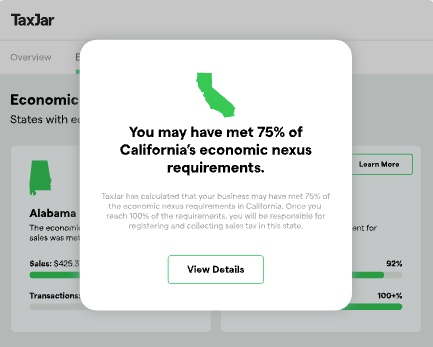
Use TaxJar to automatically monitor sales tax nexus thresholds in every state where you make a sale. TaxJar sends an alert when the business is close to the nexus threshold and when economic nexus is established. Using TaxJar to monitor nexus enables businesses to mitigate potential sales tax compliance issues and the financial burden that may result from not monitoring thresholds.
Managing TaxJar features
What are the most common TaxJar features utilized by many businesses? TaxJar offers numerous features that allow businesses to streamline their sales tax compliance. Here’s how to use them for maximum benefit.
Enrolling in AutoFile
Once enrolled in AutoFile, TaxJar automatically files and remits sales tax returns to the appropriate tax authority.. TaxJar ensures that the return is filed by the deadline, backed by a guarantee. Once a user is enrolled in a state, they don’t have to continuously enroll each time a due date comes around, TaxJar handles all the filing and remittance going forward.
axJar’s integration with e-commerce sites allows it to seamlessly sync all sales and sales tax information into each state’s specific tax form. AutoFile helps businesses maintain tax compliance, avoid potential penalties and late fees, and save time.
Sales tax reports
TaxJar sales tax reports show businesses their sales activity and the amount of sales tax that has been collected in each state. The dashboard formats data based on each state’s filing requirements, to make accounting easy.
These reports can also provide businesses with peace of mind in the event of a sales tax audit.
Why choose TaxJar for your e-commerce store
Automating sales tax compliance with TaxJar gives your business peace of mind, while saving time and money. From real-time calculations to automatic product classification, we cover all the details to ensure online businesses can focus on their customers and profitability.
Real-time calculations
TaxJar provides real-time sales tax calculations for every sales transaction. The software always includes the most up-to-date rates for every state, county, and jurisdiction, so you’ll never overcharge or undercharge a customer.
Automatic updates for changing tax laws
The TaxJar team works behind the scenes to manage tax rule updates and immediately integrate them into the system. When a tax rule or rate changes in any state, county, or jurisdiction, TaxJar updates to ensure businesses always apply the correct rate and apply sales tax for all applicable goods and services.
Businesses will never need to worry about rule changes when they use TaxJar. The updates are seamless, automatic, and hassle-free.
AI-powered product classification recommendations
Every product a business sells correlates to a specific product classification that aligns with unique tax rules. This helps determine where sales tax should be applied, based on how the product is classified in a certain state.
TaxJar uses AI to evaluate your offerings and recommend appropriate product classification When your customers purchase a product, the classification is used to assess the appropriate sales tax rate (or apply an exemption).
Nexus monitoring automation
Economic nexus thresholds determine where businesses are obligated to collect sales tax. TaxJar monitors sales transactions, calculating total sales and enabling businesses to understand when they have reached an economic threshold. TaxJar alerts businesses when nexus is established, ensuring they know when it’s time to register for a sales tax permit.
Multi-channel support
TaxJar provides multi-channel support that enables businesses to connect numerous platforms with one TaxJar account, streamlining the entire sales tax process and improving compliance.
Onboarding for Professional users
TaxJar’s Professional plan, which provides up to 10 integrations, also gives customers access to dedicated onboarding support, offering customers more extensive guidance to set up their TaxJar account.
Professional users on certain plan tiers receive hands-on assistance from a dedicated onboarding support and Customer Success Manager on how to set up their TaxJar settings, enroll in AutoFile, establish nexus states, and connect data integrations.
Ready to automate your sales tax compliance? Try TaxJar today.
It's time to solve your tax complexity
Talk to a TaxJar expert about automating your sales tax compliance.